

Facebook Page Publish is a popular plugin in the WordPress plugins repository to publish blog posts to Facebook profile or page.
But this plugins has limitations, which is using this plugin you can publish blog post only one Facebook page or profile or wall. Yes that means you can not publish a post on multiple Facebook page or wall.
So to overcome this limitation i have edit the plugins. So now using this updated plugin you can easily publish your blog post on multiple Facebook pages or walls.
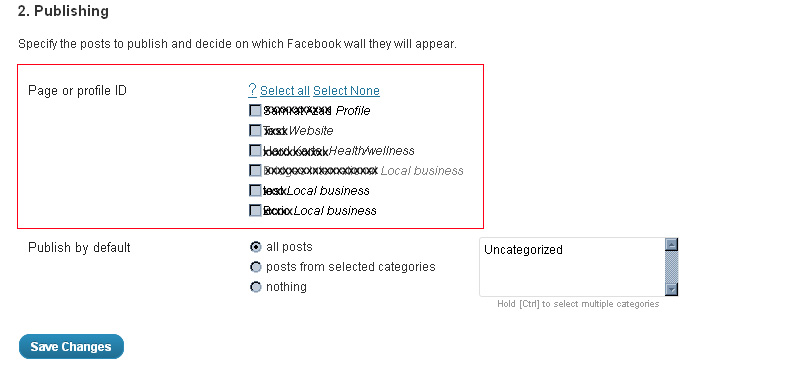
On the updated plugins admin page, you will see all of your Facebook pages and profile as list with check box. Like the above image shown here.
All you have to do is to select the Facebook pages where you want to publish the post simultaneously by checking the check box and click “Save Changes”.
I just skip the plugin installation and configuration process as it remain same to the original plugin setup process.
Click here to download the update plugins.
Those who are using this plugin and get tired to publish same post on different Facebook wall or pages by clicking again and again hopefully would appreciate this little edition on this plugin 🙂
Step into the future with CyberNetikz, where we craft tomorrow’s tech innovations with today’s coding artistry Mega Medusa Casino.
2 replies on “Publish your blog post to multiple Facebook pages or walls”
Hello:
I downloaded the plugin; however, I can only publish certain categories on a single page. I don’t have the option of publishing on different pages. Kindly help 🙂
I’ll give this a good test-run.I’ve been using various plguins for Facebook (seceral sseparateones to do what this plugin does in one place), so will be able to try everything out.Where the instructions state to use the Connect’ Tab, this is actually the Web Site’ tab.The main thing to keep in mind, is that if at first nothing is happening, or your admin is not accepting the information, don’t worry. It can take a little while for Facebook to get the info around the web and activated.