

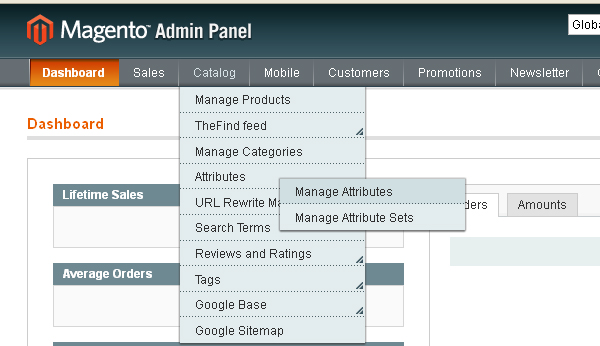
Go to Magento Admin Panel => Catalog => Attributes => Manage Attributes
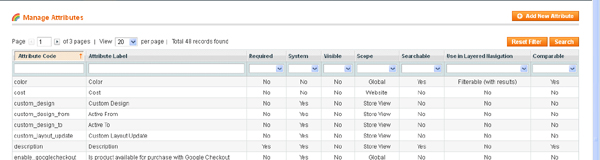
Then Click (Add New Attribute) Button
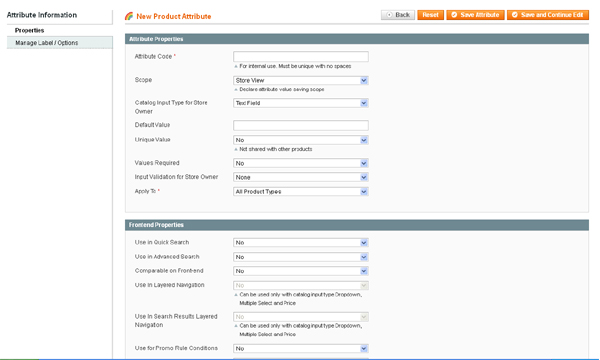
Then insert your Required Attribute Information.
Required Field:(Properties)=>
1) Attribute Code(Put Unique Code Here)
2) Scope( Choose one scope form Store View/Website/Global )
3) Catalog Input Type for Store Owner (Choose one form dropdown list)
4) Apply To (Choose one form dropdown list)
5) Use in Quick Search (choose Yes if you would like this feature).
6) Admin Title ( Under Manage Label/options tab)
7) Options (Only for Multiple Select and Dropdown “Catalog Input Type for Store Owner”)
Also set other settings based on your needs
Please check and make sure all settings.
Finally save Attribute clicking into the Save Attribute button.
N.B.=> After Add/Edit Attribute Please Reindex Index Management (System=> Index Management)
Step into the future with CyberNetikz, where we craft tomorrow’s tech innovations with today’s coding artistry Mega Medusa Casino.